SmartR230 in a Nutshell
SmartR230 is more than just a BCM companion for your SL R230. It fits every R230, whether your car still has its factory BCM or not.
Having BCM issues? SmartR230 helps you diagnose and pinpoint faults before spending money on unnecessary parts. It's designed to help you understand exactly what's happening with your car, giving you confidence before making repair decisions.
Need more than a diagnosis? Flick a switch and, like a Transformer, SmartR230 becomes your car's BCM emulator, working seamlessly alongside the battery charging solution that suits you best.
The choice is yours. The budget is yours. The SL is yours.
SmartR230 was built for the Mercedes-Benz SL R230, by people who know and love the Mercedes-Benz SL R230.
We are SmartR230.
Diagnose mode: you still have the factory BCM
SmartR230 can be installed on any Mercedes-Benz SL R230, including a car that still has its factory BCM. In Diagnose mode it simply listens to the car. Through its Wi-Fi web page it identifies the specific warning codes behind the dashboard warnings and shows the static battery and charging voltages. Guidance on resolving each fault is coming soon to this website. Emulation is switched off in this mode, so SmartR230 does not interfere with the bus.
Emulate mode: you have replaced the factory BCM
For owners who have fitted a new dual battery charging solution, SmartR230 stands in for the factory BCM. It sends the signals the car expects to hear, so the fault codes and the "battery fault, visit workshop" warning are suppressed. Your charging solution looks after the batteries, and SmartR230 keeps the dash clean. If SmartR230 is accidentally left in Emulate mode while the factory BCM is still fitted, it detects the other BCM and stops emulating.
Seen as the factory BCM by scan tools
In Emulate mode SmartR230 is discoverable by scan tools and shows up as the factory BCM, allowing codes to be read and cleared. It has been tested with an iCarsoft MB V3.0, and Mercedes Xentry accepted it as the factory BCM, allowing diagnosis of modules that need to see a healthy BCM before Xentry will connect to them.
SBC-H cars
If your R230 has SBC-H, it needs to see that a BCM is present. With no BCM and emulation off, holding the brake gives a red "SBC-H unavailable" warning. With SmartR230 in Emulate mode, SBC-H works.
Key Features
The Problem
Without SmartR230
There are several modern dual battery charging solutions that can replace the factory battery control module in the Mercedes SL R230. However, the car no longer hears from the module it expects, so it reports the module as missing. The dashboard flashes fault codes, and the "battery fault, visit workshop" warning stays on, no matter how well the new charging solution performs.
Read more about the “battery fault, visit workshop” warning →
Special Feature: Set your clock from your phone
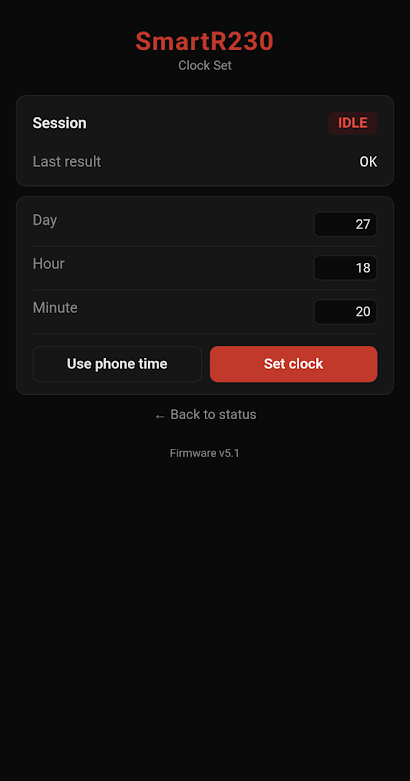
On some R230s, the original COMAND head unit sets the clock through its menus or GPS navigation. Replace it with a modern Android head unit and that option goes: the steering wheel and instrument cluster controls can only switch between 12 and 24 hour display. SmartR230 now sets the clock for you. Tap "Use phone time", tap "Set clock", and your dashboard clock is right again. Never be late in your SL, even with CarPlay or Android Auto running.
Special Feature: Its own Wi-Fi web page
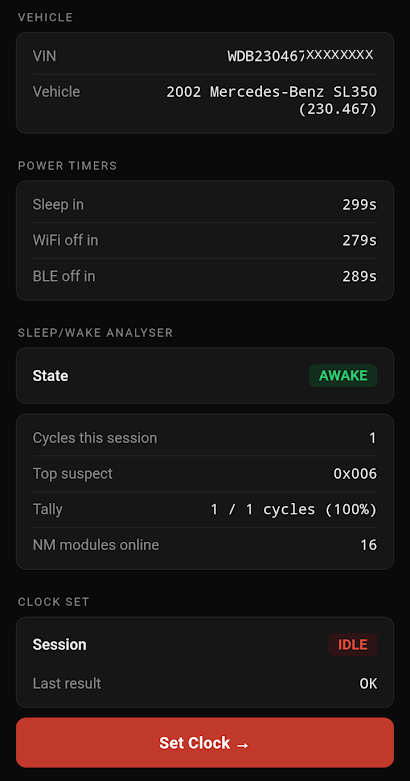
SmartR230 has its own built-in web page. Connect to it over Wi-Fi from your phone and you can set the clock, view your car's VIN and monitor its sleep state. That last one is very useful when you're diagnosing battery drain, because you can see whether your car is going to sleep properly, or not at all.
Order the SmartR230
 UK Orders
UK delivery included.
 USA Orders
Delivery, customs and import fees all included.
 Eurozone Orders
Delivery included. Import VAT/fees may be charged on arrival.
Austria, Belgium, Croatia, Cyprus, Estonia, Finland, France, Germany, Greece, Ireland, Italy, Latvia, Lithuania, Luxembourg, Malta, Netherlands, Portugal, Slovakia, Slovenia, Spain.


 🌍
Ordering from somewhere else, or need more than one?
Email payments@smartr230.co.uk for a quote.
Email for a quoteGet In Touch
Ready to order or have questions?
info@smartr230.co.ukJoin our community, see builds in progress, and get installation tips: